

Complete Guide to the Grade Calculator
Master all four calculation modes: quick grading, weighted averages, final grade targets, and grading curves
1. Quick Grader
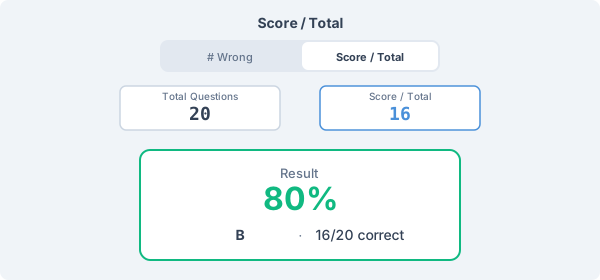
The Quick Grader mode lets you instantly convert test results to grades. Enter the total number of questions and either the number of wrong answers or your score. Switch between '# Wrong' mode (for teachers grading papers) and 'Score / Total' mode (for checking your own grade) using the toggle at the top.
The result shows your percentage, the corresponding grade on the selected scale, and the number of correct answers.
2. Weighted Average
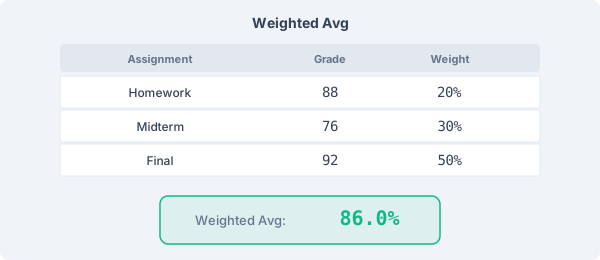
The Weighted Average mode calculates your overall grade from multiple assignments, each with different weights. Add your assignments with their scores, maximum points, and weight percentages.
The weight bar shows whether your weights total 100%. If they don't, the calculator automatically normalizes them for accurate results.
3. Final Grade Calculator
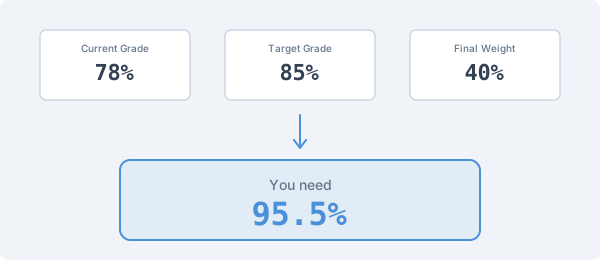
Need to know what score you need on the final exam? Enter your current grade percentage, the weight of the final exam, and select your target grade. The calculator tells you exactly what percentage you need to achieve your goal.
If the required score exceeds 100%, the tool shows 'Not possible'. If you've already achieved the target grade regardless of the final, it shows 'Guaranteed'.
4. Grading Curves
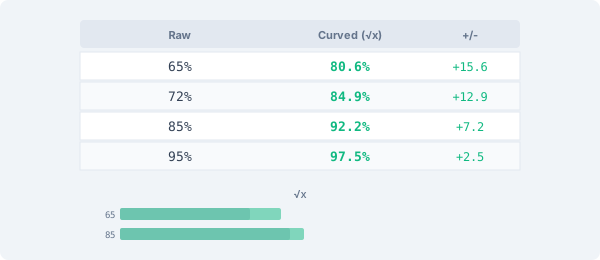
The Curve Calculator adjusts a set of scores using one of four methods. Enter comma-separated scores, choose a method, and see how each score changes.
Linear adds a fixed number of points. Percentage multiplies by a factor. Square Root applies a transformation that helps lower scores more. Highest-as-100 scales so the top score becomes 100%.
5. Grading Scales
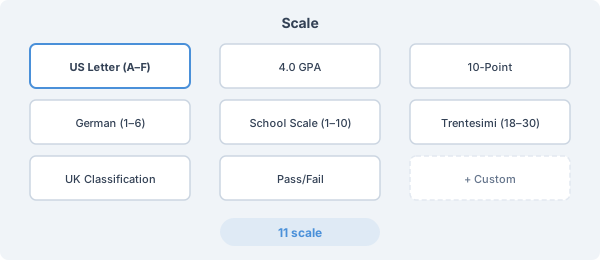
Choose from 11 built-in grading scales including US Standard (A-F), European (0-10), French (0-20), Italian (School 1-10, University 0-30, Graduation 0-110), Greek (Secondary 0-20, University 0-10), and Pass/Fail. Italian and Greek scales display official academic classifications alongside the numeric grade.
Need a custom scale? Select 'Custom Scale' to define your own grade names and percentage thresholds. You can import and export custom scales in JSON format.
Ready to Calculate?
Try the grade calculator now — enter your scores and see your grades instantly.
Open Grade Calculator