

Creating WAV Files for Testing
Export DTMF sequences and telecom tones as high-quality audio files
When You Need DTMF WAV Files
Pre-recorded DTMF files are useful in several scenarios: automated testing of phone systems, creating demonstration audio for training materials, providing consistent test signals that can be replayed exactly the same way each time, and generating reference recordings for decoder calibration.
Configuring Your Sequence
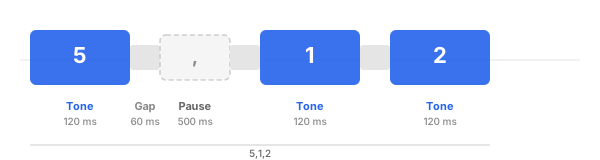
Before exporting, set up your sequence and timing parameters. Enter the digit sequence in the input field, using commas for pauses where needed. Then adjust these settings in the Advanced Settings panel:
Tone duration controls how long each digit sounds. Gap duration sets the silence between consecutive digits. Comma pause length determines how long each comma pause lasts. Twist adjusts the relative volume of the two frequencies.
Exporting and Using WAV Files
Click the download button next to the sequence input to generate and save a WAV file. The file is rendered at 44.1 kHz with 16-bit PCM encoding — CD quality audio.
You can also export individual telecom tones (dial tone, busy signal, ringback, congestion) using the download buttons in the Telecom Tones section. Select your desired duration before downloading.