

Dual Oscillator & Beat Frequencies
Create beat frequencies and binaural beats with two oscillators
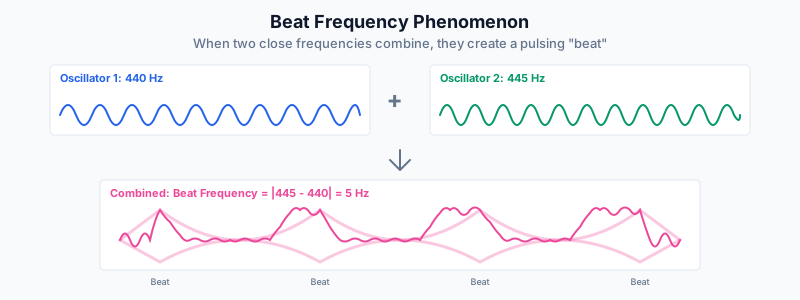
440 Hz + 445 Hz = 5 Hz beat frequency
What is Dual Oscillator Mode?
Dual oscillator mode plays two independent tones simultaneously. When two tones are close in frequency, they create an audible pulsing effect called a beat frequency.
The beat frequency equals the difference between the two frequencies. For example, 440 Hz and 445 Hz create a 5 Hz beat.
Dual Mode Controls
The dual oscillator panel provides independent control over each oscillator:
- Frequency 1: The frequency of the first oscillator (20-20000 Hz)
- Frequency 2: The frequency of the second oscillator (20-20000 Hz)
- Waveform 1: The waveform shape for oscillator 1
- Waveform 2: The waveform shape for oscillator 2
- Mix: Balance between the two oscillators (0-100%)
Binaural Beats
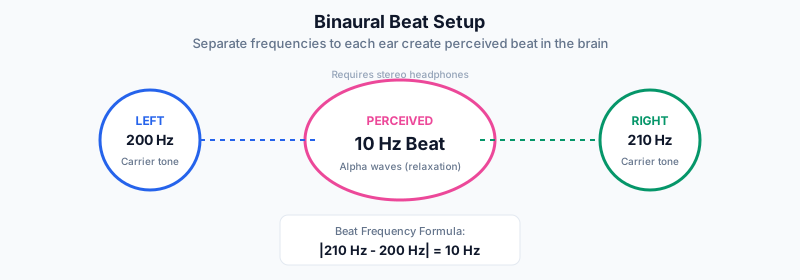
When listening through headphones with different frequencies in each ear, the brain perceives the beat frequency. This is called a binaural beat and is used in meditation and relaxation.
| Brainwave | Frequency Range | Mental State |
|---|---|---|
| Delta | 0.5 – 4 Hz | Deep sleep, healing |
| Theta | 4 – 8 Hz | Meditation, creativity |
| Alpha | 8 – 13 Hz | Relaxed focus, calm |
| Beta | 13 – 30 Hz | Alert, active thinking |
Applications
Instrument Tuning
Set both frequencies to the same value. When your instrument matches, the beating stops.
Try Tuning ModeAlpha Relaxation
Use a 10 Hz beat frequency for calm, focused relaxation. Best with headphones.
Try Alpha BeatsMusical Intervals
Explore musical intervals by setting frequencies to harmonic ratios (e.g., 440 Hz and 660 Hz for a perfect fifth).
Try Perfect FifthURL Parameters
Share dual oscillator settings via URL:
- gmode=dual — Activates dual oscillator mode
- df1 — First oscillator frequency
- df2 — Second oscillator frequency
- dw1 — Waveform for oscillator 1
- dw2 — Waveform for oscillator 2
- dmix — Mix balance (0-100)
Example: #gmode=dual&df1=440&df2=445