

Bandpass Noise Filtering
Shape noise frequency content with precision bandpass filters
Try Filtered Noise
Pink noise filtered to 200-4000 Hz
What is Bandpass Filtering?
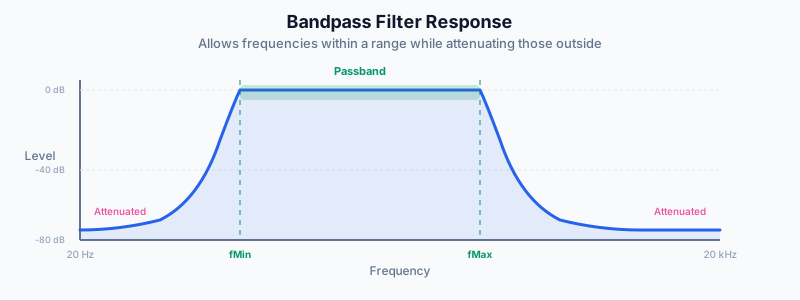
A bandpass filter allows only frequencies within a specified range to pass through, removing frequencies above and below the cutoff points.
This is useful for focusing noise on specific frequency ranges, such as bass-only noise for masking low-frequency disturbances.
Filter Controls
The filter panel appears when a noise waveform is selected:
- Filter Toggle: Turn the bandpass filter on or off
- Low Cut (Fmin): The high-pass cutoff frequency (20-20000 Hz)
- High Cut (Fmax): The low-pass cutoff frequency (20-20000 Hz)
- Filter Slope: How sharply the filter cuts (12, 24, or 36 dB/octave)
Noise Types Only: The bandpass filter is only available for noise waveforms (white, pink, brown, blue, violet, grey). It has no effect on tonal waveforms.
Filter Slopes Explained
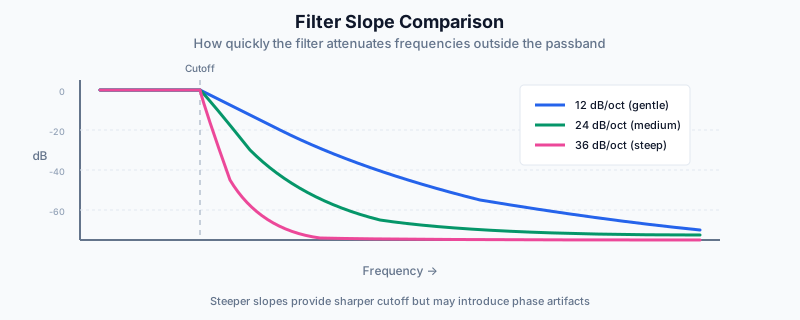
The slope determines how sharply frequencies are attenuated beyond the cutoff:
| Filter Slope | Rolloff | Character |
|---|---|---|
| 12 dB/oct | Gentle | Gradual transition, some frequencies leak through |
| 24 dB/oct | Medium | Good balance of sharpness and smoothness |
| 36 dB/oct | Steep | Sharp cutoff, more precise frequency isolation |
Applications
Focus Noise
Filter to speech frequencies (100-1000 Hz) to mask distracting conversations.
Try Focus NoiseLow-Freq Masking
Brown noise filtered to 50-500 Hz masks traffic rumble and HVAC noise.
Try Masking NoiseURL Parameters
Share filter settings via URL:
- filt=1 — Enable bandpass filter
- fmin — Low cut frequency in Hz
- fmax — High cut frequency in Hz
- fslope — Filter slope (12, 24, or 36)
Example: #wave=pinknoise&filt=1&fmin=200&fmax=4000
Advertisement