

Pulse Mode & Window Shapes
Generate continuous pulse trains for transient response testing and timing applications
Try Pulse Mode
1 kHz tone, 10 pulses/second, 10% duty cycle
What is Pulse Mode?
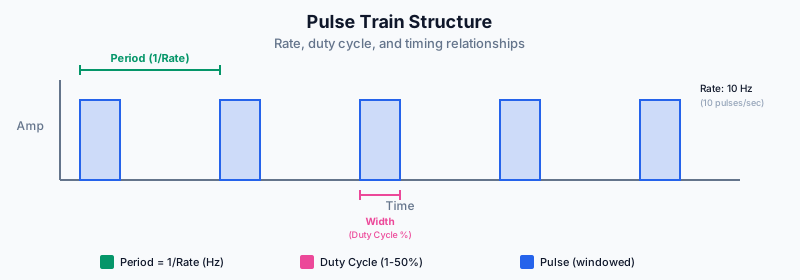
Pulse mode generates a continuous train of short tone pulses at a specified rate. Unlike burst mode which plays a set number of bursts, pulse mode runs continuously.
Pulse mode is ideal for testing speaker transient response and creating metronome-like timing references.
Pulse Controls
The pulse panel provides control over the pulse train:
- Tone Frequency: The frequency of the tone within each pulse (20-20000 Hz)
- Pulse Rate: How many pulses per second (1-100 Hz)
- Pulse Width: The duty cycle as a percentage (1-50%)
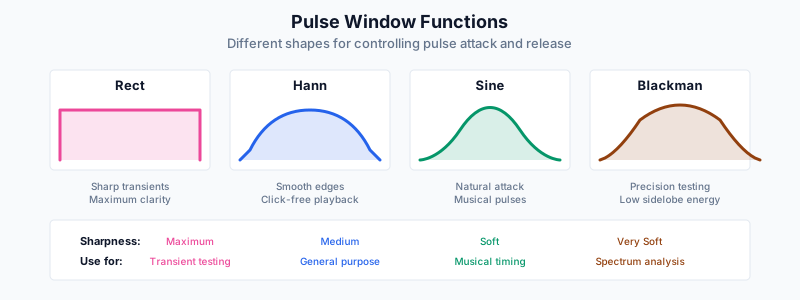
- Window Shape: How each pulse is shaped (rect, hann, sine, blackman)
Duty Cycle: Pulse width determines what fraction of each period contains sound. 10% at 10 Hz = 10ms pulse every 100ms.
Window Shapes
Window shapes control how smoothly each pulse starts and ends:
| Shape | Character | Best For |
|---|---|---|
| Rectangle | Sharp, may click | Maximum transient impact |
| Hann | Smooth, click-free | General testing |
| Sine | Gentle transitions | Comfortable listening |
| Blackman | Ultra-smooth | Precision measurement |
Applications
URL Parameters
Share pulse settings via URL:
- gmode=pulse — Activates pulse mode
- pfreq — Tone frequency in Hz
- prate — Pulses per second
- pwidth — Duty cycle percentage
- pwin — Window shape (rect, hann, sine, blackman)
Advertisement