

Frequency Sweep Mode Guide
Sweep through frequencies for speaker testing, hearing tests, and room acoustics
20 Hz to 20 kHz sweep over 10 seconds
What is a Frequency Sweep?
A frequency sweep continuously changes the audio frequency from a starting point to an ending point over a specified duration. This is useful for:
- Testing speaker and headphone frequency response
- Checking your hearing range and sensitivity
- Finding room resonances and acoustic problems
Sweep Controls
The sweep panel provides precise control over your frequency sweep:
- Start Frequency: The frequency where the sweep begins (20-20,000 Hz)
- End Frequency: The frequency where the sweep ends (20-20,000 Hz)
- Duration: How long the sweep takes (0.1-60 seconds)
- Sweep Type: Linear or logarithmic frequency progression
- Sweep Mode: Choose between one-shot (plays once) or bounce (ping-pong between frequencies)
- Repeat Count: Number of times to repeat the sweep (1-99)
- Audio Markers: Play click sounds at decade frequencies (10, 100, 1k, 10k Hz)
Sweep Modes
Choose how the sweep behaves when it reaches the end frequency:
| Mode | Behavior | Best For |
|---|---|---|
| One-shot | Sweeps from start to end, then stops | Single frequency response tests |
| Bounce | Sweeps up, then down, repeating | Continuous testing, finding resonances |
Linear vs Logarithmic Sweep
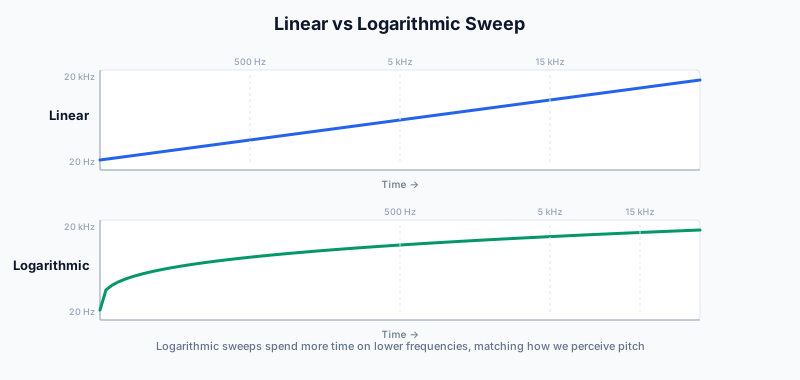
The sweep type determines how the frequency changes over time:
| Type | Behavior | Best For |
|---|---|---|
| Linear | Equal Hz change per second | Technical testing, narrow ranges |
| Logarithmic | Equal time per octave | Full-range sweeps, hearing tests |
Preset Frequency Ranges
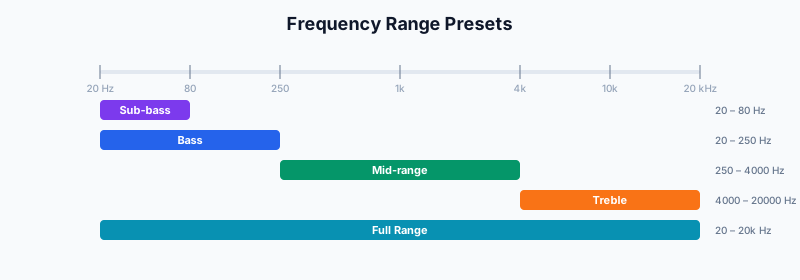
Use the preset buttons to quickly set up common frequency ranges:
| Preset | Range | Best For |
|---|---|---|
| Full Range | 20 – 20,000 Hz | Complete speaker/hearing test |
| Bass | 20 – 250 Hz | Subwoofer, woofer testing |
| Mid | 250 – 4,000 Hz | Midrange driver testing |
| Treble | 4,000 – 20,000 Hz | Tweeter testing, hearing upper limit |
| Sub Bass | 20 – 80 Hz | Deep bass only, subwoofer focus |
Reading the Frequency Gauge
During a sweep, the gauge provides visual feedback:
- The needle shows the current frequency being played
- The colored arc fills as the sweep progresses
- The digital display shows the exact frequency in Hz
Practical Applications
Speaker Testing
Run a full-range sweep to find rattles, distortion, or dead spots in your speakers. Listen for buzzing, crackling, or sudden volume changes at specific frequencies.
Try Speaker TestHearing Range Test
Discover your hearing range by listening for where you can first hear the tone (low end) and where it fades out (high end). Most adults can't hear above 15-17 kHz.
Try Hearing TestRoom Acoustics
Find room resonances by playing a slow bass sweep. Standing waves cause certain frequencies to sound much louder or quieter depending on your position in the room.
Try Room TestSweep URL Parameters
You can bookmark or share specific sweep configurations using URL parameters:
- mode=sweep — Activates sweep mode (vs generator mode)
- sweepStart — Starting frequency in Hz
- sweepEnd — Ending frequency in Hz
- sweepDur — Sweep duration in seconds
- sweepType — Sweep type (linear or log)
- sweepMode — Sweep mode (oneshot or bounce)
- sweepRepeat — Number of sweep repetitions (1-99)
- sweepMarkers — Audio markers at decades (1 = on)
Example: #mode=sweep&sweepStart=100&sweepEnd=10000&sweepMode=bounce