

How the Tone Generator Works
Learn about frequency, waveforms, musical notes, and hearing safety
1. Frequency and Pitch
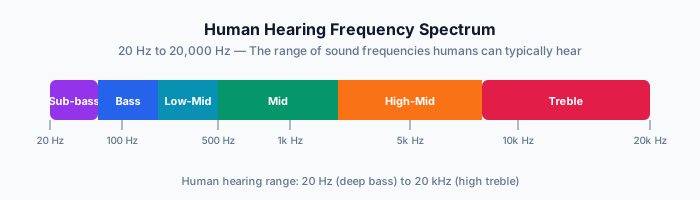
Frequency is the number of sound wave cycles per second, measured in Hertz (Hz). Higher frequency means higher pitch.
- 20 Hz — Lowest audible frequency (deep bass rumble)
- 440 Hz — Standard tuning pitch (A4 note)
- 1,000 Hz — Mid-range, used in hearing tests
- 20,000 Hz — Upper limit of human hearing
The frequency slider uses a logarithmic scale because human pitch perception is logarithmic—doubling the frequency raises the pitch by one octave.
2. Waveform Types
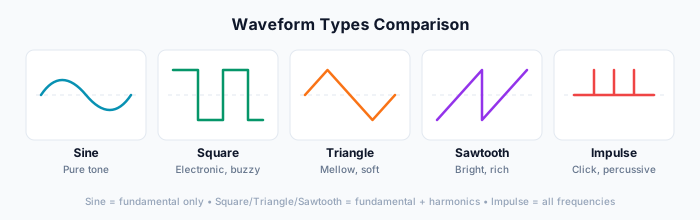
Different waveforms produce different timbres (tone colors) at the same frequency:
| Waveform | Sound | Use Case |
|---|---|---|
| Sine | Pure, smooth tone | Hearing tests, tuning, calibration |
| Square | Hollow, buzzy | Retro/chiptune sounds, testing harmonics |
| Triangle | Softer than square | Bass sounds, gentle tones |
| Sawtooth | Bright, harsh | Synth leads, rich harmonic content |
Sine waves contain only the fundamental frequency. Square, triangle, and sawtooth waves contain harmonics (multiples of the fundamental) that give them their distinctive sounds.
3. Musical Notes and Cents
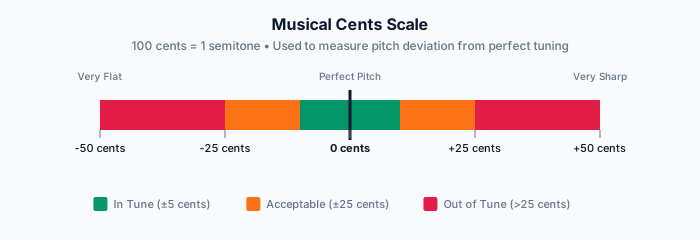
The tool displays the nearest musical note and how many cents the frequency deviates from that note. There are 100 cents per semitone.
- 0 cents — Exactly in tune
- +/- 5 cents — Essentially in tune (most ears can't detect)
- +/- 50 cents — Halfway to the next semitone
Cents vs Hz: The Relationship
Cents and Hz have a logarithmic relationship, not a linear one. This means the same number of cents represents different Hz intervals depending on the frequency:
- At 440 Hz (A4): 1 cent ≈ 0.25 Hz
- At 880 Hz (A5): 1 cent ≈ 0.51 Hz
- At 220 Hz (A3): 1 cent ≈ 0.13 Hz
This is because pitch perception is logarithmic—doubling the frequency always raises the pitch by one octave (1200 cents), regardless of the starting frequency.
Example: From 440 Hz to 445 Hz = 1200 × log₂(445/440) ≈ +20 cents
The A4 reference setting lets you choose between 440 Hz (standard), 432 Hz (alternative tuning), or 442 Hz (orchestral tuning). All cent calculations are relative to your chosen reference.
4. Volume and Hearing Safety
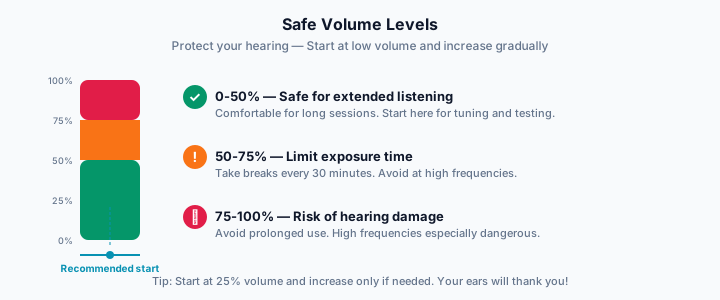
The volume control defaults to 20% for safety. If you can't hear the tone, check your device volume first before increasing the tool's volume slider.
5. Stereo Pan
The pan control positions the sound in the stereo field:
- L (Left) — Sound plays only in the left speaker/earphone
- C (Center) — Equal volume in both speakers
- R (Right) — Sound plays only in the right speaker/earphone
Use stereo panning to test if both speakers/earphones are working correctly.
6. Why Can't I Hear Certain Frequencies?
Several factors can affect what you hear:
- Phone/laptop speakers — Most cannot reproduce frequencies below 100-200 Hz. Use headphones for low frequencies.
- Age — Hearing naturally declines, especially above 15 kHz. Many adults can't hear 18+ kHz.
- Volume too low — Higher frequencies often need slightly more volume to be perceived equally loud.
- Browser restrictions — Audio requires a user interaction (tap/click) before it will play.
7. Sample Rate
The sample rate determines audio quality and the maximum frequency that can be accurately reproduced:
- 44.1 kHz — CD quality, max ~20 kHz (standard)
- 48 kHz — Video standard, max ~22 kHz
- 96 kHz — Hi-res audio, max ~44 kHz
- 192 kHz — Studio quality, max ~88 kHz
Higher sample rates provide better waveform visualization at high frequencies, but offer no audible benefit above 48 kHz since human hearing tops out at ~20 kHz.
8. URL Parameters
The tool state is saved in the URL, making it easy to bookmark or share specific settings:
- freq — Frequency in Hz (20-20000)
- wave — Waveform type (sine, square, triangle, sawtooth)
- vol — Volume (0-1)
- pan — Stereo pan (-1 to 1)
- a4 — A4 reference frequency (432, 440, 442)
- viz — Visualizer on/off (0, 1)
Example: #freq=440&wave=sine&vol=0.2
9. Advanced Modes
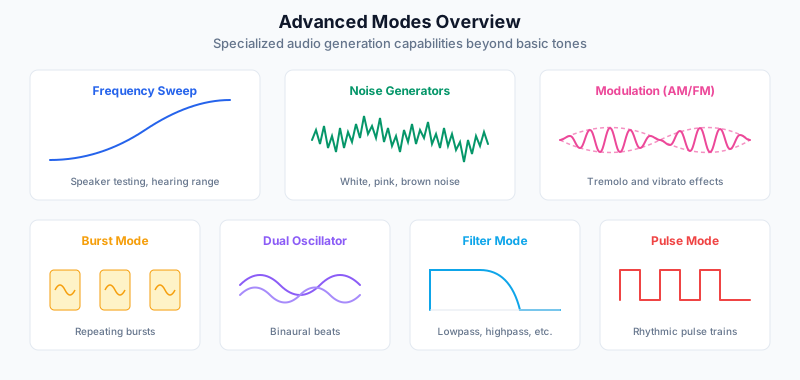
Beyond basic tone generation, the tool offers several advanced modes for specialized audio work:
| Advanced Modes | Use Case |
|---|---|
| Frequency Sweep | Glide through a frequency range (linear or logarithmic) for speaker testing and hearing assessment. |
| Noise Generators | White, pink, and brown noise for relaxation, focus, sound masking, and speaker calibration. |
| Modulation (AM/FM) | Add tremolo (AM) or vibrato (FM) effects by modulating amplitude or frequency with an LFO. |
| Burst Mode | Generate repeating tone bursts with adjustable duration, interval, and envelope shape. |
| Dual Oscillator | Two independent oscillators for binaural beats, interference patterns, and stereo effects. |
| Filter Mode | Apply lowpass, highpass, bandpass, or notch filters with adjustable cutoff and resonance. |
| Pulse Mode | Create rhythmic pulse trains with variable rate, duty cycle, and window functions. |
Each mode has a dedicated guide with detailed explanations and use cases.
Sources & Further Reading
- Wikipedia. "Audio frequency" - Comprehensive overview of the audible frequency range and frequency bands. Wikipedia
- Mozilla Developer Network. "Web Audio API" - Technical documentation for browser-based audio generation and processing. MDN
- NASA Quesst. "Science of Sound" - Educational resource on sound wave physics and properties. NASA
- Johns Hopkins University. "Sound Waves" - Mathematical foundations of sound and music. JHU
- Britannica. "Sound Physics" - Scientific explanation of wave propagation and the inverse square law. Britannica
Ready to Generate Tones?
Create precise audio tones with adjustable frequency, waveform, volume, and stereo pan.
Open Tone Generator