

Time Expression Calculator
Type time calculations in natural notation — combine hours, minutes, seconds with +, −, ×, ÷ in a single expression.
Basic Syntax
The expression parser accepts several time formats:
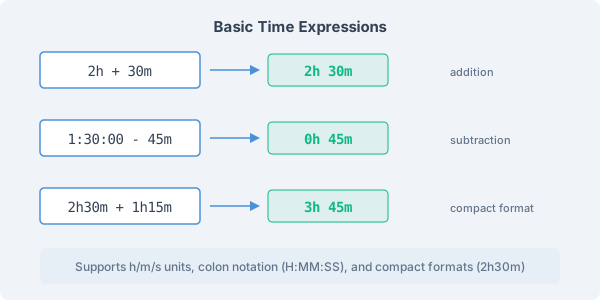
• Shorthand: 2h, 30m, 45s (hours, minutes, seconds) • Combined shorthand: 2h30m, 1h15m30s • Colon notation: 1:30:00, 0:45:00 • Mixed: combine any format with +, −, ×, ÷
Examples: "2h + 30m" gives 2:30:00. "1:30:00 − 45m" gives 0:45:00. "2h30m + 1h15m" gives 3:45:00. Results appear instantly as you type.
Advanced Expressions
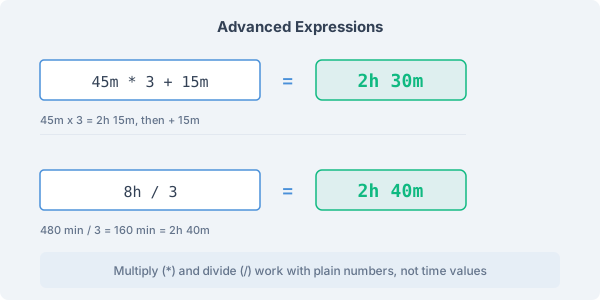
Multiplication and division work with numeric factors: "45m × 3" gives 2:15:00, and "8h ÷ 3" gives 2:40:00.
Operations are evaluated left to right, so order matters. "45m × 3 + 15m" computes 45m × 3 = 2:15:00 first, then adds 15m to get 2:30:00. But "2h + 30m × 3" computes 2h + 30m = 2:30:00 first, then × 3 = 7:30:00. Place multiplications and divisions early in the expression when they should apply to specific values.
Multilingual Expressions
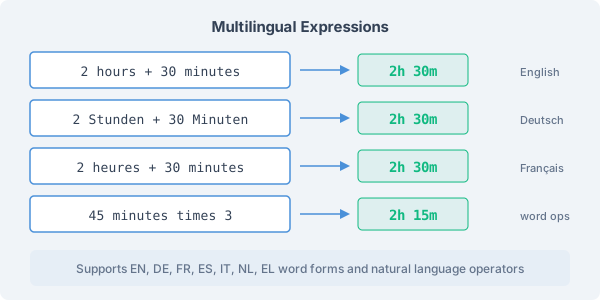
The expression parser understands time units in seven languages. Type durations using natural words:
• English: "2 hours + 30 minutes + 45 seconds" • Deutsch: "2 Stunden + 30 Minuten" • Français: "2 heures + 30 minutes" • Español: "2 horas + 30 minutos" • Italiano: "2 ore + 30 minuti" • Nederlands: "2 uur + 30 minuten" • Ελληνικά: "2 ώρες + 30 λεπτά"
Natural language operators also work: "plus", "minus", "times" instead of +, −, ×. Comma decimals are supported in all locales: "1,5 hours" or "1,5h" gives 1:30:00.
Fuzzy Matching
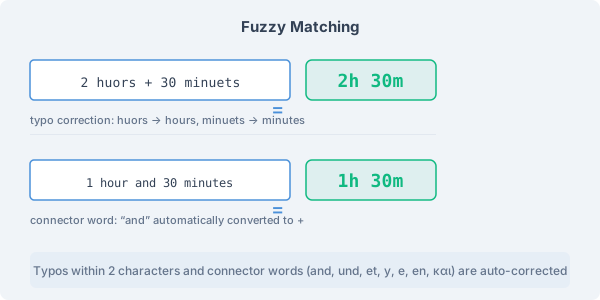
The parser includes smart matching that handles common typing mistakes and informal notation:
• Typo correction: "2 huors + 30 minuets" is recognized as "2 hours + 30 minutes" • Connector words: "2 hours and 30 minutes" automatically converts "and" to + • Space insertion: "2hours" is read as "2 hours" without needing the space • Comma decimals: "1,5h" is read as 1.5 hours in any locale
When fuzzy matching is used, the calculator shows a small indicator so you can verify the interpretation was correct.
Number Formats
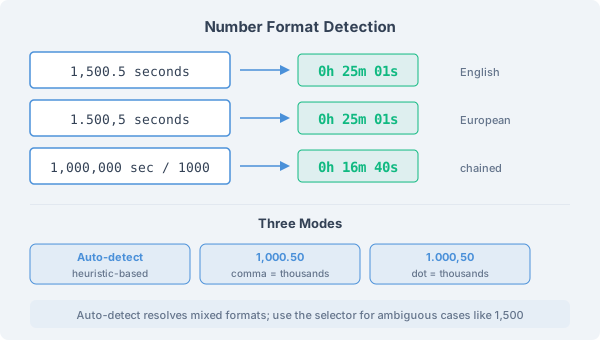
Numbers with thousands separators are supported in both English (1,000.50) and European (1.000,50) formats. By default, the parser auto-detects the format based on context:
• Mixed separators: 1,500.5 and 1.500,5 are both recognized as 1500.5 • Chained separators: 1,000,000 and 1.000.000 are both read as one million • Ambiguous cases: numbers like 1,500 are assumed to be thousands — a hint appears if you need to change this
If auto-detection doesn't match your intent, use the format selector below the input to choose between Auto-detect, English (1,000.50), or European (1.000,50).
When to Use Expressions
The expression tab is best suited for calculations you can write in one line. Common scenarios include:
• Adding up multiple times quickly: "1h30m + 2h15m + 45m + 3h" • Scaling repeated tasks: "25m × 8" for 8 meetings of 25 minutes each • Splitting time: "7h30m ÷ 3" to divide work equally among 3 people • Overtime billing: "2h30m × 1.5" for overtime at 1.5× rate
For tracking multiple days or sessions with breaks, the Timesheet tab is more convenient. For single operations, the Duration tab is simpler. Choose the tab that matches your workflow.