How to Calculate Work Hours and Compensation
Use the timesheet tab to log daily hours, deduct breaks, apply rounding, and calculate pay with your hourly rate.
Setting Up Your Timesheet
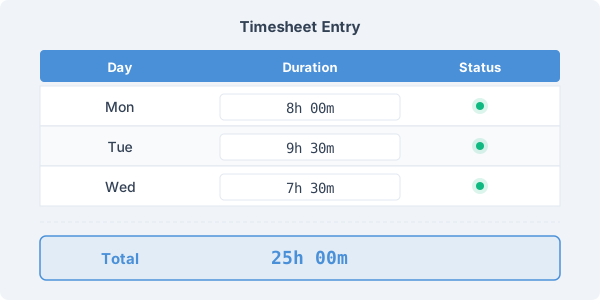
Navigate to the Timesheet tab and choose your input mode. In Duration mode, enter how long you worked each day (e.g., 8h 00m, 7h 30m). In Start/End mode, enter your clock-in and clock-out times (e.g., 9:00 → 17:30). Click the + button to add more rows.
The calculator automatically sums all entries and displays the total in both HH:MM:SS and decimal hours formats.
Breaks and Rounding
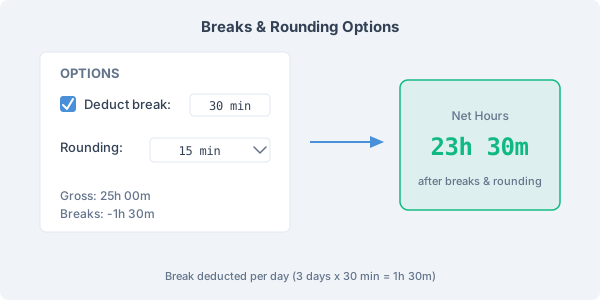
Enable break deduction to automatically subtract a fixed break from each entry. For example, setting a 30-minute break with 5 entries deducts 2.5 hours total.
Rounding adjusts the net total to the nearest increment — 6 minutes (billing in tenths of an hour), 15 minutes (quarter-hour billing), or 30 minutes (half-hour billing). The gross and net totals are shown side by side so you can see the impact.
Calculating Compensation
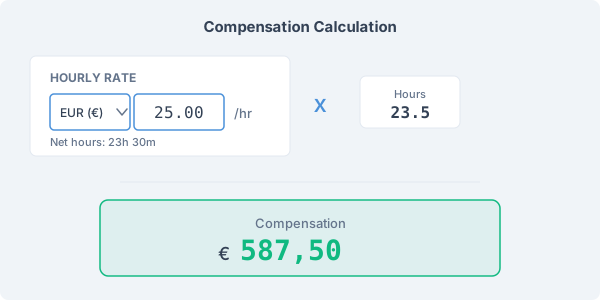
Select your currency from the dropdown and enter your hourly rate. The calculator multiplies your net decimal hours by the rate and displays the total compensation formatted in your chosen currency.
Both your currency and rate are saved automatically and persist between visits, so you only need to set them once. This feature is ideal for freelancers invoicing clients, employees verifying paychecks, or managers estimating labor costs for a project.