

How DTMF Works
A complete guide to dual-tone multi-frequency signaling and the DTMF Tone Pad
1. What Is DTMF?
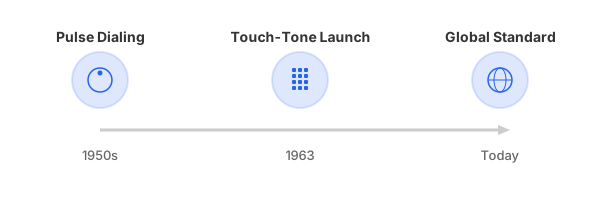
DTMF stands for Dual-Tone Multi-Frequency. It is the signaling system used by touch-tone telephones to communicate the digits you press to the telephone network. Developed at Bell Labs in the late 1950s and commercially launched by AT&T as "Touch-Tone" in 1963, DTMF replaced the older pulse dialing system used by rotary phones.
Each key on a telephone generates two simultaneous pure tones — one from a low-frequency group and one from a high-frequency group. This dual-tone approach makes the signals highly resistant to false triggers from speech or background noise.
2. The DTMF Frequency Matrix
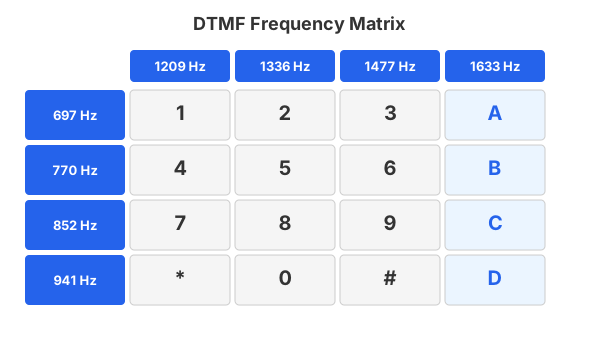
DTMF uses a 4×4 matrix of frequencies to encode 16 possible keys. Four row frequencies (697, 770, 852, and 941 Hz) are paired with four column frequencies (1209, 1336, 1477, and 1633 Hz). When you press a key, two sine waves play simultaneously — one from the row and one from the column.
For example, pressing '5' plays 770 Hz (row 2) and 1336 Hz (column 2) at the same time. This combination uniquely identifies the key.
3. Using the Tone Pad
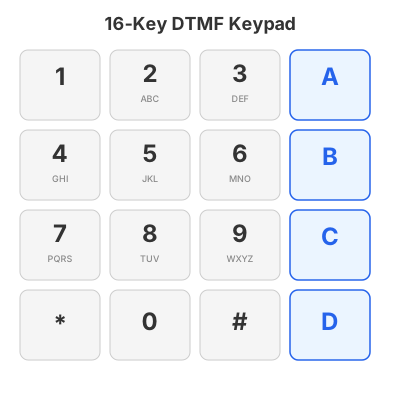
The interactive keypad lets you play authentic DTMF tones by clicking or tapping any of the 16 keys. The waveform display shows the combined signal in real time, and the frequency readout above the keypad displays the exact frequencies being generated.
You can also use keyboard shortcuts: press 0–9, *, #, or A–D on your physical keyboard to trigger the corresponding tones instantly.
4. Sequence Dialing
Type a sequence of digits into the input field and click Play to hear them dialed in order. Commas insert a configurable pause between digits — useful for simulating real-world dialing patterns like "9,5551234" where the 9 dials an outside line followed by a pause before the number.
The tone duration, gap between digits, and comma pause length can all be adjusted in Advanced Settings.
5. Advanced Settings
Fine-tune your DTMF signals with four adjustable parameters:
Tone Duration (40–500 ms)
How long each digit's tones play. Receivers listed in ITU-T Q.24 recognize tones of 40 ms or longer, and the European transmitter specification ETSI ES 201 235-2 requires at least 65 ms for automatically sent tones. The default of 120 ms provides reliable detection by most systems.
Gap Duration (40–500 ms)
The silent interval between consecutive digits. The default of 60 ms is sufficient for most decoders.
Comma Pause (200–2000 ms)
The length of the pause inserted by a comma in a sequence. Default is 500 ms.
Twist (−4 to +4 dB)
Twist is the level difference between the two tones of a DTMF signal — by convention the high-group level minus the low-group level. Receiver limits vary by network: the administrations listed in ITU-T Q.24 accept differences of 5 to 10 dB, and AT&T's criterion accepts a high group up to 4 dB above or 8 dB below the low group. Positive twist means the high-frequency tone is louder; negative means the low-frequency tone is louder.
6. WAV Export
Download any DTMF sequence or telecom tone as a standard WAV audio file. The exported file uses 44.1 kHz sample rate and 16-bit PCM encoding — the same quality as an audio CD.
Enter your sequence, adjust the timing settings to your needs, then click the download button. The file is generated entirely in your browser — nothing is sent to a server.
7. The A, B, C, D Keys
The standard telephone keypad has 12 keys (0–9, *, #), but the DTMF system actually defines 16. The four extra keys — A, B, C, and D — occupy a fourth column at 1633 Hz.
These keys were originally designed for the U.S. military's AUTOVON (Automatic Voice Network) telephone system, where they indicated call priority levels: A = Flash Override (highest), B = Flash, C = Immediate, D = Priority.
8. Sources & Standards
The DTMF system is defined by international telecommunications standards. The key references are:
- ITU-T Recommendation Q.23. "Technical features of push-button telephone sets" — the DTMF frequency allocation and transmitter tolerances. ITU-T Q.23 (1988)
- ITU-T Recommendation Q.24. "Multifrequency push-button signal reception" — receiver criteria adopted by various administrations. ITU-T Q.24 (1988)
- ETSI ES 201 235-2. "Specification of Dual Tone Multi-Frequency (DTMF) Transmitters and Receivers; Part 2: Transmitters" — European transmitter requirements. ETSI ES 201 235-2 (2000)
- Schenker, L. "Pushbutton Calling with a Two-Group Voice-Frequency Code," The Bell System Technical Journal, vol. 39, no. 1 — the original two-group code design. Schenker (1960)
- Wikipedia. "Dual-tone multi-frequency signaling" - Comprehensive overview of the DTMF system, frequencies, and history. Wikipedia — DTMF signaling
- Wikipedia. "Precise tone plan" - North American call-progress tones. Wikipedia — Precise tone plan
Ready to Play DTMF Tones?
Try the interactive DTMF Tone Pad — play individual tones, dial sequences, explore telecom signals, and export WAV files.
Open DTMF Tone Pad